Overview
You can integrate with your Zoom account to import your data. In this section, we will explain how to connect/Disconnect your Zoom account and how to delete your Zoom recordings from Quallie.Ai.
1. Connecting Zoom Integration
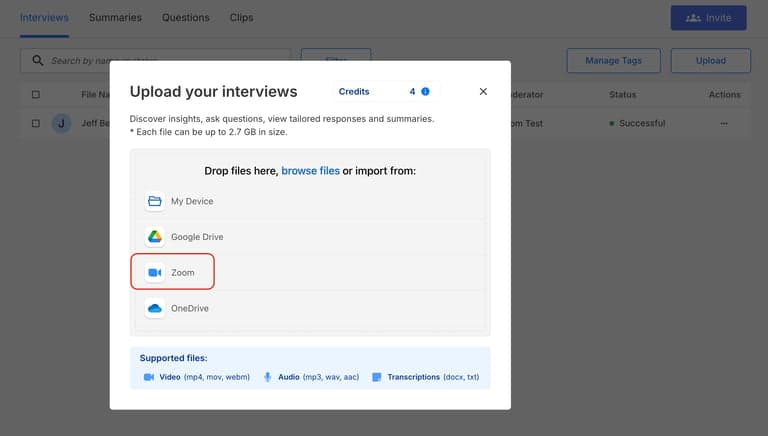
You can easily upload videos directly from Zoom. When uploading a file, select the Zoom option as shown in the screenshot above.
2. Disconnecting Zoom Integration
To remove Zoom access:
Log in to your Zoom account and navigate to the Zoom App Marketplace.
Click Manage and then select Added Apps, or use the search function to locate the Quallie.Ai app.
Click on the Quallie.Ai app.
Select Remove to disconnect the integration.
3. Data and Privacy
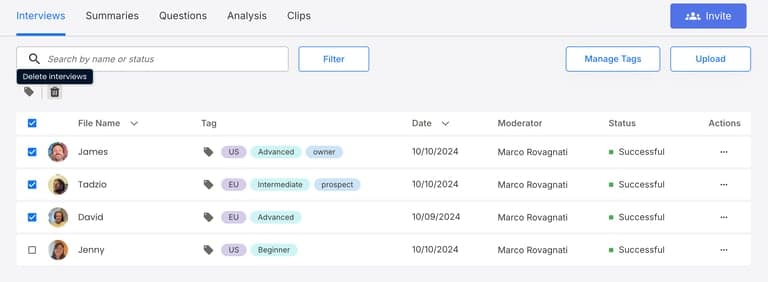
We only access and download the specific Zoom videos that you choose to import. We do not store or access any other Zoom account information. After disconnecting Zoom, you can delete imported videos from your account. To do this, go to Interviews, select the recordings you wish to remove, and click the bulk delete icon.